
| 일 | 월 | 화 | 수 | 목 | 금 | 토 |
|---|---|---|---|---|---|---|
| 1 | 2 | |||||
| 3 | 4 | 5 | 6 | 7 | 8 | 9 |
| 10 | 11 | 12 | 13 | 14 | 15 | 16 |
| 17 | 18 | 19 | 20 | 21 | 22 | 23 |
| 24 | 25 | 26 | 27 | 28 | 29 | 30 |
| 31 |
- 삼항 연산
- 오버로딩
- Break
- Integer.MAX_VALUE
- extends
- 삼항 연산식
- Else If
- arraylist
- 문자열
- scanner
- If
- for문
- Integer.MIN_VALUE
- 배열
- rs.next()
- super()
- jsp
- 다형성
- javascript
- 상수
- 2차원 배열
- 이중 배열
- 중첩for문
- 이클립스
- 상속
- interface
- 메소드
- 자바
- 인터페이스
- docker
- Today
- Total
개발로드
☆KDT 2024-04-08★SpringBoot-Maven-Thymeleaf Layout Dialect 본문
Thymeleaf Layout Dialect
Dependency
<!-- 타임리프의 fragment 설정시 필요  -->
<dependency>
    <groupId>nz.net.ultraq.thymeleaf</groupId>
    <artifactId>thymeleaf-layout-dialect</artifactId>
    <version>3.2.1</version>
</dependency>
header.html
<!DOCTYPE html>
<html lang="ko" xmlns:th="http://www.thymeleaf.org"
      xmlns:sec="http://www.thymeleaf.org/extras/spring-security"> <!-- 권한별로 html을 다르게 설정하기 위해 -->
<div th:fragment="header">  <!-- 공통영역을 설정,  header라는이름으로 공통영역으로 사용할 것임을 나타냄 -->
    <nav class="navbar  navbar-expand-sm bg-dark navbar-dark">
        <a class="navbar-brand" href="/">CSHOP</a>
        <button class="navbar-toggler" type="button" data-toggle="collapse" data-target="#navbarTogglerContent"
                aria-controls="navbarTogglerContent" aria-expanded="false" aria-label="Toggle navigation">
            <span class="navbar-toggler-icon"></span>
        </button>
        <div class="collapse navbar-collapse" id="navbarTogglerContent">
            <ul class="navbar-nav mr-auto mt-2 mt-lg-0">
                <!-- 관리자 계정(ADMIN)으로 로그인한 경우 상품 등록, 상품 관리 메뉴를 보여줌 -->
                <li class="nav-item" sec:authorize="hasAnyAuthority('ROLE_ADMIN')"> <!-- 제시된 권한중 하나만 가지고 있어도 true, 그렇지 않으면 false-->
                    <a class="nav-link" href="/admin/item/new">상품 등록</a>
                </li>
                <li class="nav-item" sec:authorize="hasAnyAuthority('ROLE_ADMIN')">
                    <a class="nav-link" href="/admin/items">상품 관리</a>
                </li>
                <!-- 장바구니와 구매이력 페이지의 경우 로그인(인증) 했을 경우에만 보여주도록 설정-->
                <li class="nav-item" sec:authorize="isAuthenticated()"><!-- 인증된 사용자라면 true -->
                    <a class="nav-link" href="/cart">장바구니</a>
                </li>
                <li class="nav-item" sec:authorize="isAuthenticated()">
                    <a class="nav-link" href="/orders">구매이력</a>
                </li>
                <!-- 로그인 하지 않은 상태에서는 로그인 메뉴를 보여줌 -->
                <li class="nav-item" sec:authorize="isAnonymous()"> <!-- 익명 사용자이면 true, 로그인 안한 사용자도 익명 -->
                    <a class="nav-link" href="/members/login">로그인</a>
                </li>

                <!-- 로그인한 상태이면 로그아웃 메뉴를 보여줌 -->
                <li class="nav-item" sec:authorize="isAuthenticated()">
                    <a class="nav-link" href="/members/logout">로그아웃</a>
                </li>
            </ul>
            <form class="form-inline my-2 my-lg-0"   th:action="@{/}" method="get">
                <input class="form-control mr-sm-2" type="search" placeholder="Search" aria-label="Search">
                <button class="btn btn-outline-success my-2 my-sm-0" type="submit">Search</button>
            </form>
        </div>
    </nav>
</div>
</html>
footer.html
<!DOCTYPE html>
<html lang="ko" xmlns:th="http://www.thymeleaf.org">
<div class="footer bg-dark text-white" th:fragment="footer">
<h2>CSHOP©2024</h2>
</div>
</html>
layout.html
<!DOCTYPE html>
<html lang="ko" xmlns:th="http://www.thymeleaf.org"
      xmlns:layout="http://www.ultraq.net.nz/thymeleaf/layout"
      xmlns="http://www.w3.org/1999/html">
<meta name="viewport" content="width=device-width, initial-scale=1">
<head>
    <meta charset="UTF-8">
    <title>Title</title>
    <link rel="stylesheet" href="https://cdn.jsdelivr.net/npm/bootstrap@4.6.2/dist/css/bootstrap.min.css" integrity="sha384-xOolHFLEh07PJGoPkLv1IbcEPTNtaed2xpHsD9ESMhqIYd0nLMwNLD69Npy4HI+N" crossorigin="anonymous">
    <script src="https://cdn.jsdelivr.net/npm/jquery@3.5.1/dist/jquery.slim.min.js" integrity="sha384-DfXdz2htPH0lsSSs5nCTpuj/zy4C+OGpamoFVy38MVBnE+IbbVYUew+OrCXaRkfj" crossorigin="anonymous"></script>
    <script src="https://cdn.jsdelivr.net/npm/popper.js@1.16.1/dist/umd/popper.min.js" integrity="sha384-9/reFTGAW83EW2RDu2S0VKaIzap3H66lZH81PoYlFhbGU+6BZp6G7niu735Sk7lN" crossorigin="anonymous"></script>
    <script src="https://cdn.jsdelivr.net/npm/bootstrap@4.6.2/dist/js/bootstrap.min.js" integrity="sha384-+sLIOodYLS7CIrQpBjl+C7nPvqq+FbNUBDunl/OZv93DB7Ln/533i8e/mZXLi/P+" crossorigin="anonymous"></script>


    <style>
        .footer {
            height: 100px;
            line-height: 100px;
            text-align: center;
            margin-top: 20px;
            background-color: darkblue;
            color: white;
        }

        .footer > h2 {
            height: 100px;
            line-height: 100px;
        }
        .nav{
            width: 980px;
            margin: 0 auto;
        }
    </style>

</head>
<body>
<div class="wrap">
    <div th:replace="~{fragments/header::header}"></div>
    <div layout:fragment="content" class="content">
        <h1>레이아웃 페이지</h1>
    </div>
    <div th:replace="~{fragments/footer::footer}"></div>
</div>
</body>
</html>
signIn.html
<!DOCTYPE html>
<html lang="ko" xmlns:th="http://www.thymeleaf.org"
      xmlns:layout="http://www.ultraq.net.nz/thymeleaf/layout"
      layout:decorate="~{layouts/layout}">
<!--<head>-->
<meta charset="UTF-8">
<meta name="viewport" content="width=device-width, initial-scale=1.0">
<!-- Latest compiled and minified CSS -->
<link rel="stylesheet" href="https://cdn.jsdelivr.net/npm/bootstrap@4.6.2/dist/css/bootstrap.min.css">
<!-- jQuery library -->
<script src="https://cdn.jsdelivr.net/npm/jquery@3.7.1/dist/jquery.slim.min.js"></script>
<!-- Popper JS -->
<script src="https://cdn.jsdelivr.net/npm/popper.js@1.16.1/dist/umd/popper.min.js"></script>
<!-- Latest compiled JavaScript -->
<script src="https://cdn.jsdelivr.net/npm/bootstrap@4.6.2/dist/js/bootstrap.bundle.min.js"></script>
<style>
    p.fieldError {
        color: hotpink;
    }
</style>
<script>
    //회원가입시 실패하면 에러 메시지 경고창 보여주기
    $(document).ready(function () {
        const errorMessage = "[[${errorMessage}]]";
        if (errorMessage != null) {
            alert(errorMessage);
        }//end of if
    });//전체 함수 끝
</script>
<title>회원가입</title>
<!--</head>-->
<!--<body>-->

<div layout:fragment="content" class="content">
    <div class="container mx-auto ">
        <div class="text-center mt-5">
            <h2 class="mt-4 mb-3 ">회원 가입</h2>
        </div>
        <div class="content border col-md-7  mx-auto">
            <form action="/members/signIn" role="form" method="post" th:object="${memberDto}" class="pl-5">
                <div class="form-group col-md-8 mt-3">
                    <label th:for="id">아이디</label>
                    <input type="text" th:field="*{userid}" class="form-control" placeholder="User Id">
                    <p th:if="${#fields.hasErrors('userid')}" th:errors="*{userid}" class="fieldError">입력 오류</p>
                </div>
                <div class="form-group col-md-8 mt-3">
                    <label th:for="name">이름</label>
                    <input type="text" th:field="*{name}" class="form-control" placeholder="이름을 입력해주세요">
                    <p th:if="${#fields.hasErrors('name')}" th:errors="*{name}" class="fieldError">입력 오류</p>
                </div>
                <div class="form-group col-md-8">
                    <label th:for="email">이메일주소</label>
                    <input type="email" th:field="*{email}" class="form-control" placeholder="이메일을 입력해주세요">
                    <p th:if="${#fields.hasErrors('email')}" th:errors="*{email}" class="fieldError">입력 오류</p>
                </div>
                <div class="form-group col-md-8">
                    <label th:for="password">비밀번호</label>
                    <input type="password" th:field="*{password}" class="form-control" placeholder="비밀번호 입력">
                    <p th:if="${#fields.hasErrors('password')}" th:errors="*{password}" class="fieldError">입력 오류</p>
                </div>
                <div class="form-group col-md-8">
                    <label th:for="address">주소</label>
                    <input type="text" th:field="*{address}" class="form-control" placeholder="주소를 입력해주세요">
                    <p th:if="${#fields.hasErrors('address')}" th:errors="*{address}" class="fieldError">입력 오류</p>
                </div>
                <div class="text-center mb-3">
                    <button type="submit" class="btn btn-primary" style="">Submit</button>
                </div>
                <input type="hidden" th:name="${_csrf.parameterName}" th:value="${_csrf.token}">
            </form>

        </div>
    </div>
</div>

<!--</body>-->
</html>
결과화면
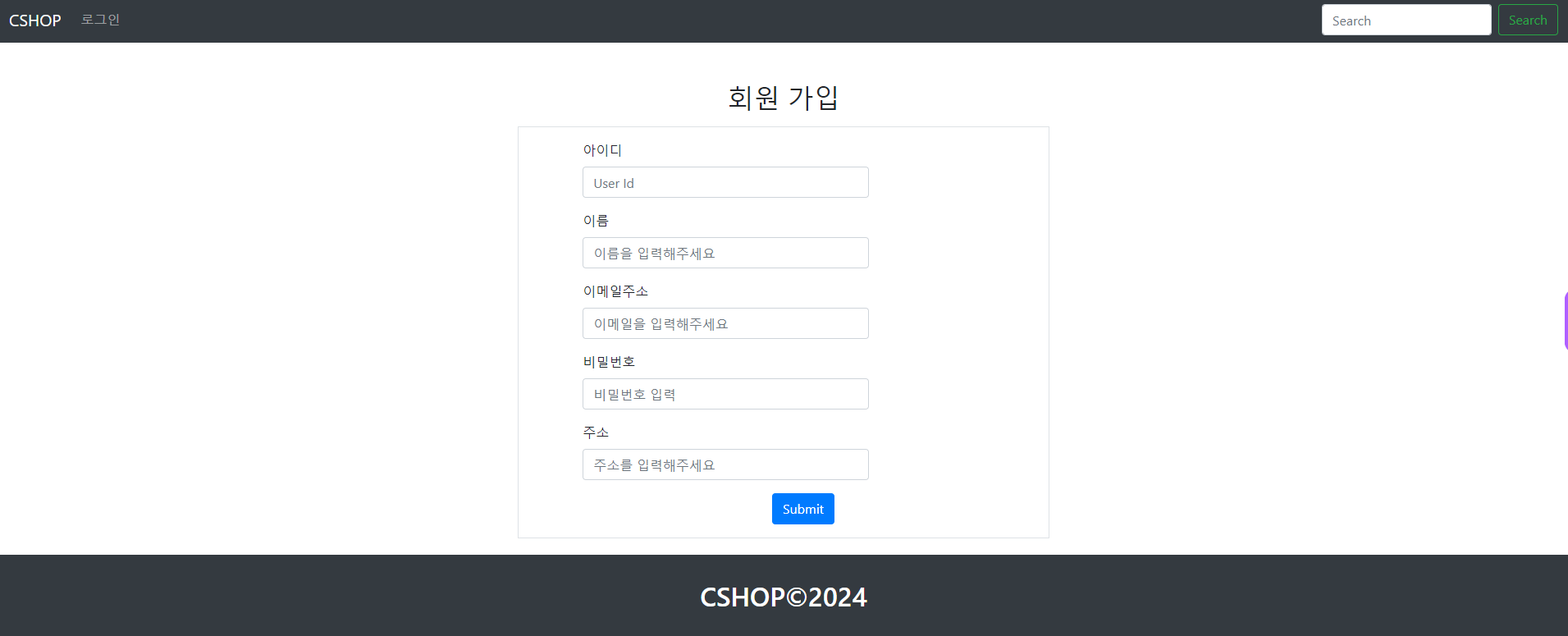
코드설명
xmlns:layout="http://www.ultraq.net.nz/thymeleaf/layout"
xmlns="http://www.w3.org/1999/html"
xmlns:layout="http://www.ultraq.net.nz/thymeleaf/layout":
이 줄은 접두사 "layout"을 사용하여 네임스페이스를 선언하고 이를 URL "http://www.ultraq.net.nz/thymeleaf/layout와 연결합니다. /공들여 나열한 것)".
XML의 네임스페이스는 XML 문서 또는 다른 소스의 조각이 결합될 때 이름 지정 충돌을 방지하는 데 사용됩니다.
이 경우 네임스페이스 선언은 "layout"이라는 접두어가 붙은 요소나 속성이 Thymeleaf Layout Dialect와 연결될 것임을 나타냅니다.
Thymeleaf Layout Dialect는 템플릿 레이아웃에 대한 지원을 제공하는 Thymeleaf의 확장으로, 동적 콘텐츠에 대한 자리 표시자를 사용하여 재사용 가능한 레이아웃을 정의할 수 있습니다.
xmlns="http://www.w3.org/1999/html":
이 줄은 XML 문서의 기본 네임스페이스를 선언합니다.
XML에서는 접두사가 없는 요소와 속성에 기본 네임스페이스가 적용됩니다.
여기서 네임스페이스는 HTML 네임스페이스를 나타내는 URI인 "http://www.w3.org/1999/html"로 설정됩니다. .
이 선언은 접두사가 없는 요소와 속성(예: <html>, <head>, <body> 등)이 HTML 네임스페이스에 속하며 W3C에서 정의한 HTML 표준을 준수함을 나타냅니다. (월드와이드웹 컨소시엄).
요약하자면, 이러한 네임스페이스 선언은 XML 문서 내의 요소와 속성을 해석하고 특정 방언이나 표준과 연관시키는 방법을 정의합니다. 첫 번째 선언은 요소와 속성을 Thymeleaf Layout Dialect와 연관시키는 반면, 두 번째 선언은 문서가 HTML 표준을 따른다는 것을 나타냅니다.
xmlns:sec="http://www.thymeleaf.org/extras/spring-security"
네임스페이스 선언:
xmlns:sec=은 접두사 sec를 사용하여 새 XML 네임스페이스를 선언합니다.
http://www.thymeleaf.org/extras/spring-security는 이 네임스페이스와 연관된 URI(Uniform Resource Identifier)입니다.
목적:
이 선언은 sec 접두어를http://www.thymeleaf.org/extras/spring-security네임스페이스와 연결합니다.
Spring Security가 포함된 Spring 애플리케이션에서 Thymeleaf를 사용할 때 이 네임스페이스를 사용하면 Thymeleaf Spring Security 통합 기능에 액세스할 수 있습니다.
Thymeleaf Spring 보안 통합:
Thymeleaf는 Spring Security 방언을 포함한 다양한 방언을 통해 추가 기능을 제공합니다.
Spring Security 방언은 Spring Security 기능을 Thymeleaf 템플릿에 통합하기 위한 지원을 제공합니다.
이 네임스페이스 선언을 사용하면 HTML 템플릿에서 Spring Security 방언이 제공하는 Thymeleaf 속성을 사용할 수 있습니다.
사용법:
이 네임스페이스가 선언되면 'sec' 접두사를 사용하여 Thymeleaf 템플릿 내의 Spring Security 관련 속성 및 표현식에 액세스할 수 있습니다.
예를 들어 sec:authorize 속성을 사용하면 사용자의 인증 상태나 권한에 따라 HTML 콘텐츠를 조건부로 렌더링할 수 있습니다.
요약하면 xmlns:sec=" http://www.thymeleaf.org/extras/spring-security " 선언을 사용하면 sec 접두사를 적절한 네임스페이스와 연결하여 Thymeleaf Spring Security 통합 기능을 활용할 수 있습니다. 이를 통해 Spring Security 기능을 Thymeleaf 템플릿에 완벽하게 통합하여 웹 애플리케이션에 향상된 보안 기능과 유연성을 제공할 수 있습니다.
여유가 되신다면 제 GitHub에 오셔서 좋은 코드들을 구경해주세요!

https://github.com/gimpo5975?tab=repositories
gimpo5975 - Overview
gimpo5975 has 6 repositories available. Follow their code on GitHub.
github.com
'JAVA' 카테고리의 다른 글
| ☆KDT 2024-04-16★SpringBoot-쇼핑몰(2) (0) | 2024.04.17 |
|---|---|
| ★KDT 2024-04-15☆SpringBoot-쇼핑몰(1) (0) | 2024.04.15 |
| ★KDT 2024-04-05☆SpringBoot-Maven- SpringSecurity (0) | 2024.04.05 |
| ☆KDT 2024-04-04★SpringBoot-Maven-암호화, 어노테이션,회원가입 (0) | 2024.04.04 |
| ★KDT 2024-04-03☆SpringBoot-Maven- SpringSecurity,Test, 계층분리 (0) | 2024.04.03 |


